Search by Keyword(s)


Choosing an Alert, Update or Email
When Armanino has important information to share with external audiences, it’s important for project managers to understand which project type to select to initiate the process. The purpose of this article is to help a marketer decide which project type to use based on the content and timeliness the audience needs to receive it.
Decision Tree
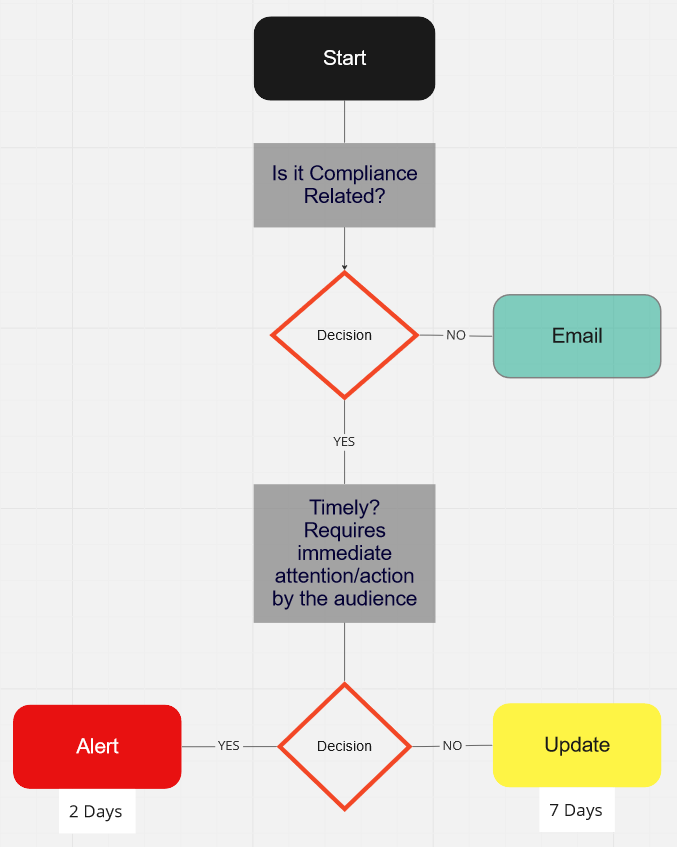
Use the decision tree below as a starting point:
Differences between an Alert and an Update
The topic of an Alert is regulatory or compliance in nature and requires immediate attention (timely) or action by Armanino clients and/or prospects. Completed and delivered via email within 2 days. Non-editable Eloqua template.
The topic of an Update is regulatory or compliance in nature and does not require immediate attention (not timely) or action by Armanino client’s and/or prospects. Completed and delivered via email within 7 days. Non-editable Eloqua template.
If the topic of a request falls outside the definition of an Alert or Update (not regulatory, compliance or timely in nature), an Email project type should be used. Completed and delivered within 10 - 15 days.
Qualifications for an Alert or Update
- Compliance-related
- The information relays an important standard update, change, release, etc.
- Pricing change
- The information is time-sensitive or relates to a due date or deadline
- Deadline approaching (within 3 weeks)
- The information relays an important standard update, change, release, etc.
*not a compliance change= software or platform no longer being maintained/deletion forthcoming
- Regulatory-related
- The information pertains to a current event, bill, changing law, etc.
- New legislation passed
- Updated information from IRS or other governing body
- The information pertains to a current event, bill, changing law, etc.
*not a regulation change= people moving
- BOTH Updates and Alerts MUST be regarding a regulatory change when a reader would need this info as it would sufficiently impact their business.
Example of an Alert in WorkFront: Alert - Penalty Relief Tax
Example of an Update in WorkFront: Update - SEC Rulemaking Climate Disclosure
NOTE: Both Alerts and Updates can be all inclusive in the email and don't necessarily require an article on the website or other external location.
Timing
Calculated from when the request is converted into a project to when the email is deployed.
Alert: 2-3 days.
Update: 5-8 days.
Email: 10-15 days.

Once a decision has been made on a project type, it must be entered into WorkFront before being worked on.
Also see Urgent Project Request Policy
Not applicable and still need more guidance? See all the different WorkFront Marketing project types here: Project Types in WorkFront